lalu burn ke dalam DVD
JARINGAN KOMPUTER
Jaringan Komputer ialah sebuah rangkaian sistem komputer yang terdiri atas komputer-komputer yang terintegrasi satu sama lain yang memungkinkan setiap komputer untuk saling berbagi, tukar menukar informasi, data dan berkomunikasi.Readmore...
WINDOWS
Microsoft Windows atau yang lebih dikenal dengan sebutan Windows adalah keluarga sistem operasi. yang dikembangkan oleh Microsoft, dengan menggunakan antarmuka pengguna grafis.Readmore..
LINUX
Linux adalah sistem operasi berbasis Unix yang dibuat oleh Linus Torvalds, dikembangkan oleh GNU General Public License. Linux bersifat open-source atau bebas digunakan atau didownload oleh pengguna komputer diseluruh dunia atau juga disebut dengan istilah FOSS (Free / Open Source Software) Readmore...
Macintosh OS X
Macintosh OS merupakan system operasikomputer yang dibuat oleh Apple. Apple yang sebelumnya bernamaApple Computer, Inc adalah sebuah perusahaan Silicon Valley berbasisdi Cupertino, California, yang bergerak dalam bidang teknologikomputer. Apple membantu bermulanya revolusi komputer pribadi padatahun 1970-an dengan produknya Apple II dan memajukannya sejak tahun 1980-an hingga sekarang dengan Macintosh.Readmore...
My Software
Software komputer adalah sekumpulan data elektronik yang disimpan dan diatur oleh komputer, data elektronik yang disimpan oleh komputer itu dapat berupa program atau instruksi yang akan menjalankan suatu perintah. Readmore...
Download Linux Mint dan Instalasi
lalu burn ke dalam DVD
Download Debian Linux 6 Squeeze ISO / CD / DVD Images
Debian GNU/Linux version 6.0 has been released ( jump to download ) after 24 months of constant development and available for download in various media format. Debian 6.0 is a free operating system, coming for the first time in two flavours. Alongside Debian GNU/Linux, Debian GNU/kFreeBSD is introduced with this version as a "technology preview". It also supports various processor architectures and includes the KDE, GNOME, Xfce, LXDE and other desktop environments. It also features compatibility with the FHS v2.3 and software developed for version 3.2 of the LSB.
What's new in Debian 6.0
Debian 6.0 introduces a dependency based boot system, making system start-up faster and more robust due to parallel execution of boot scripts and correct dependency tracking between them. Various other changes make Debian more suitable for small form factor notebooks, like the introduction of the KDE Plasma Netbook shell. Following new updated major software packages are included:
KDE Plasma Workspaces and KDE Applications version 4.4.5
an updated version of the GNOME desktop environment version 2.30
the Xfce version 4.6 desktop environment
LXDE version 0.5.0
X.Org version 7.5
OpenOffice.org version 3.2.1
GIMP version 2.6.11
Iceweasel version 3.5.16 (an unbranded version of Mozilla Firefox)
Icedove version 3.0.11 (an unbranded version of Mozilla Thunderbird)
PostgreSQL version 8.4.6
MySQL version 5.1.49
GNU Compiler Collection version 4.4.5
Linux kernel version 2.6.32
Apache web server version 2.2.16
Samba file and print server version 3.5.6
Python version 2.6.6, 2.5.5 and 3.1.3
Perl version 5.10.1
PHP version 5.3.3
Asterisk version 1.6.2.9
Nagios version 3.2.3
Xen Hypervisor 4.0.1 (dom0 as well as domU support)
OpenJDK version 6b18
Tomcat version 6.0.18
And more than 29,000 other ready-to-use software packages, built from nearly 15,000 source packages.
Debian 6 klik Download
Debian provides all packages on CD / DVD and the total size is around 32GB+ for all media files. You only need to download first CD / DVD and install the base system. Once downloaded, use the Internet to install any packages.
Please note that the latest stable version is 6.0.4.
32 bit vs 64 bit Debian Linux Version
For almost all PCs use 32 bit version. For e.g., most machines with Intel/AMD type processors.
Choose 64 bit version to take full advantage of computers based on the AMD64 or EM64T architecture (e.g., Athlon64, Opteron, EM64T Xeon, Core 2 duo).
Debian 6 DVD ISO download
There are total 8 DVD images:
Visit mirror to download Debian ISO image 32 bit i386 DVD ISO (4.4 GB each)
Visit mirror to download Debian ISO images 64 bit DVD ISO (4.4 GB each)
Download images from the following mirror:
Debian 6 DVD ISO BitTorrent download
Download from BitTorrent i386 32 bit DVD (requires a BitTorrent client)
Download from BitTorrent 64 bit DVD (requires a BitTorrent client)
Debian 6 Upgrade over the Internet
You can upgrade Debian 5.0 to 6.0 simply following these instructions.
Debian Linux 6 Download Mirrors list
Please see Debian mirror download and release page for further information.
Download Debian Linux 5 Lenny ISO / CD / DVD Images
Download Debian Linux 7 Lenny ISO / CD / DVD Images
What's new in Debian 5.0
The installation process for Debian GNU/Linux 5.0 has been improved in many ways: among many other improvements, support for installation from more than one CD or DVD has been restored, firmware required by some devices can be loaded by using removable media, and installations via Braille display are supported. The installer boot process has also received much attention: a graphical menu can be used to choose front-ends and desktop environments, and to select expert or rescue mode. The installation system for Debian GNU/Linux has now been translated to 63 languages. Following new updated major software packages are included:- 23,000 Open source software
- K Desktop Environment 3.5.10 (KDE)
- GNOME desktop environment 2.22.2
- OpenOffice.org 2.4.1
- GIMP 2.4.7
- Iceweasel 3.0.6 (an unbranded version of Mozilla Firefox)
- Icedove 2.0.0.19 (an unbranded version of Mozilla Thunderbird)
- PostgreSQL 8.3.6, MySQL 5.0.51a
- GNU Compiler Collection 4.3.2
- Linux kernel version 2.6.26
- Apache 2.2.9, Samba 3.2.5, Python 2.5.2 and 2.4.6, Perl 5.10.0, PHP 5.2.6, Asterisk 1.4.21.2, Emacs 22, Inkscape 0.46, Nagios 3.06
- Xen Hypervisor 3.2.1 (dom0 as well as domU support)
- OpenJDK 6b11

(Fig.01: Default Debian Linux 5 Gnome Desktop in Action, image credit: Tuxradar)
The installation process for Debian GNU/Linux 5.0 has been improved in many ways: among many other improvements, support for installation from more than one CD or DVD has been restored, firmware required by some devices can be loaded by using removable media, and installations via Braille display are supported. The installer boot process has also received much attention: a graphical menu can be used to choose front-ends and desktop environments, and to select expert or rescue mode. The installation system for Debian GNU/Linux has now been translated to 63 languages.
Please note that Debian provides all packages on CD / DVD and the total size is around 18GB for all media files. You only need to download first CD / DVD and install the base system. Once done use the Internet to install any packages.
Debian 5 Download
You can download Debian Linux 5 via the web/ftp server or via BitTorrent (recommended).32 bit vs 64 bit Debian version
- For almost all PCs select 32 bit version. For e.g., most machines with Intel/AMD/etc type processors.
- Choose 64 bit version to take full advantage of computers based on the AMD64 or EM64T architecture (e.g., Athlon64, Opteron, EM64T Xeon, Core 2).
Debian 5 DVD ISO download
There are total 5 DVD images:- Visit mirror to download Debian ISO image 32 bit i386 DVD ISO (4.4 GB each)
- Visit mirror to download Debian ISO images 64 bit DVD ISO (4.4 GB each)
Debian download: Debian 5 CD ISO download
There are total 31 ISO images, I strongly suggest to get DVD images :Debian Linux 5 DVD ISO BitTorrent download
Download images from the following mirror:Debian 5 DVD ISO BitTorrent download
- Download from BitTorrent i386 32 bit DVD (requires a BitTorrent client)
- Download from BitTorrent 64 bit DVD (requires a BitTorrent client)
Debian 5 Upgrade over the Internet
- You can upgrade Debian 4.0 to 5.0 simply following these instructions.
Debian Linux 5 Download Mirrors list
- Please see Debian mirror download and release page for further information.
Install LAMP Server di Ubuntu
Install Melalui Tasksel , jika belum terinstall silahkan install dahulu , buka terminal :
Kemudian jalankan tasksel di terminal :
tasksel
Pilih LAMP Server
saat installasi , akan muncul pertanyaan permintaan MYSQL password , silahkan isi password mysql anda
Untuk Mengecek berjalan atau tidak :
buka browser : ketik localhost , jika berjalan akan muncul It Work's
buat file php
nano /var/www/info.php
isikan : <?php phpinfo(); ?>
save dan exit
restart service apache2
/etc/init.d/apache2 restart
jalankan di browser : localhost/info.php
Install phpmyadmin
apt-get install phpmyadmin
kemudian buka
localhost/phpmyadmin atau http://ip-address/phpmyadmin ( 192.168.1.24/phpmyadmin)
Download Backtrack 5 r3 Edisi Terbaru
Apa Beda Backtrcak 5 R3 Artikel Baru Backtrack Blackhat 5 R3?
* Menurut SAYA inisial hanya masalah kode nama untuk OS nya Saja, kalo di Windows ADA Win XP, Win 7, Win 8, karena Backtrack 5 R3 inisial dirilis di Acara B l ackhat / Defcon (Acara klien untuk membuka posisi berkumpulnya hacker-hacker blackhat ari seluruh Dunia) 2012 di A merika, jadi orangutan-orangutan sering nyebut Artikel Baru OS Backtrack 5 R3 Blackhat Edition
Bisa dilihat di Blog BackTrack berikut inisial http://www.backtrack-linux .org/backtrack/backtrack-5-r3-released /
Identifikasi Host Hidup
- dnmap - Nmap Distributed
- address6 (Kedua "Alive6" entry) - konversi alamat IPv6
- Jigsaw - Menyambar informasi tentang karyawan perusahaan
- Uberharvest - E-mail pemanen
- sslcaudit - SSL Cert Audit
- VoIP madu - VoIP Honeypot
- urlcrazy - Mendeteksi kesalahan ketik URL yang digunakan dalam typo jongkok, url pembajakan, phishing
- Apache_users - Apache pencacah nama pengguna
- Deblaze - Melakukan pencacahan & interogasi terhadap titik akhir flash jarak jauh
- Tnscmd10g - Memungkinkan Anda untuk menyuntikkan perintah ke Oracle
- BBQSQL - Blind SQL injection toolkit
- Blueranger - Menggunakan kualitas link untuk mencari perangkat Bluetooth
- Lynis - Scans sistem & perangkat lunak untuk masalah keamanan
- DotDotPwn - Directory Traversal fuzzer
- Netgear-telnetable - Mengaktifkan Telnet pada perangkat konsol Netgear
- Termineter - tester meter Cerdas
- Htexploit - Alat untuk memotong perlindungan direktori standar
- Jboss-Autopwn - Sebarkan JSP shell pada target server JBoss
- Websploit - Scans & sistem analisis remote untuk kerentanan
Wireless Eksploitasi Alat
- Bluepot - Bluetooth honeypot
- Spooftooph - Parodi atau klon Bluetooth perangkat
- Smartphone-pentest-Kerangka
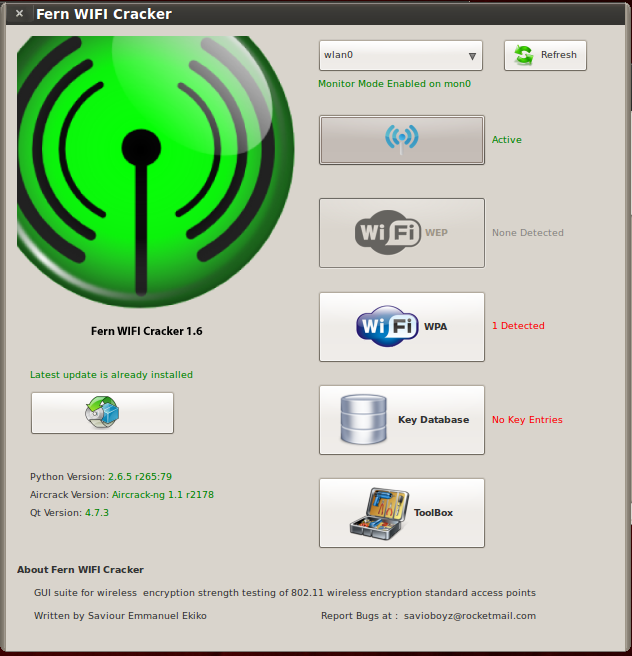
- Fern-Wifi-cracker - Gui untuk menguji kekuatan enkripsi Wireless
- Wi-fihoney - Menciptakan AP palsu menggunakan semua enkripsi dan monitor dengan Airodump
- Wifite - auditor nirkabel Otomatis
- Creddump
- Pemuda luntang-lantung
- Manglefizz
- Ophcrack
- Phrasendresher
- Rainbowcrack
- Acccheck
- smbexec
Semoga Bermanfaat :)
Install Flock di Ubuntu
2. Simpan saja di Desktop Anda untuk mempermudah.
3. Ekstrak file hasil download Flock browser, klik kanan di file Flock yang Anda download lalu pilih Extract here dan lalu di Desktop akan muncul sebuah folder yang bernama “Flock”.
4. Jalankan Terminal, dengan login sebagai root, copy folder Flock yang ada di desktop ke dalam folder /opt/Untuk login sebagai root silahkan gunakan perintah :
” obeth@obeth-laptop:/home/obeth# sudo su
” root@obeth-laptop:/home/obeth# cp -R flock/ /opt/
Konfigurasi RDP pada Ubuntu 10.4
Remote Desktop Protocol (sering disingkat menjadi RDP) adalah sebuah protokol jaringan yang digunakan oleh Microsoft Windows Terminal Services dan Remote Desktop. RDP dibuat berdasarkan protokol T.120 yang spesifikasinya diumumkan oleh International Telecommunication Union (ITU), yang juga merupakan protokol yang digunakan di dalam perangkat lunak konferensi jarak jauh Microsoft NetMeeting.- Check list pada Allow other users to view your desktop
- Allow users to control your desktop (optional), ini dichecklist jika kita memberikan akses penuh ke user.
- You must confirm each access to this machine (jika ini dipilih, setiap user yang akan mengakses ke desktop, harus dikonfirmasi dulu)
- Require the user to enter this password (ini akan memberikan kata sandi ke setiap user yang masuk, dalam kotak kosong, isilah kata sandi tersebut)
- Configure network automatically to accept connection (untuk membiarkan akses secara otomatis)
- Pilihan untuk menampilkan icon. Setelah itu kita memilih option yang ada tutup window tersebut.

Disini kita tidak akan berbicara banyak, cukup dengan menggunakan RealVNC free. download di sini.
Masuk ke terminal : kemudian ketik perintah : vncviewer ip_address_remote_server
Jika kita belum menginstall salah satu paket dibawah ini (karena vncviewer bisa aktif jika paket2 telah terinstal), kita akan diminta untuk menginstalnya terlebih dahulu, paket paket tersebut adalah :
- xvnc4viewer
- tightvnc-java
- vnc-java
: sudo apt-get install nama_paket.
Pengertian Linux
Linux adalah sistem operasi berbasis Unix yang dibuat oleh Linus Torvalds, dikembangkan oleh GNU General Public License. Linux bersifat open-source atau bebas digunakan atau didownload oleh pengguna komputer diseluruh dunia atau juga disebut dengan istilah FOSS (Free / Open Source Software). Beberapa keunggulan dari Linux antara lain: